Services and equipment service
The Services (Usługi) tab holds your service orders, rentals, insurance, vouchers and passes. On the left are My services (Moje usługi, in progress and completed), on the right the centre's offer in the sub-tabs Service (Serwis), Insurance (Ubezpieczenie), Voucher, Pass (Karnet) and Rental (Wypożyczenie). The Order (Zamów) button next to an item opens the sign-up wizard (Online sign-up).
You also add extra services for courses and trips (e.g. insurance, nitrox, equipment rental) in the item details: chapter Courses, trips and services.
Service request
The Service (Serwis) sub-tab has the service price list and, below it, the Report equipment (Zgłoś sprzęt) form. Use it to send equipment for inspection, repair or certification, or to file a complaint. A service request needs no contract and no SMS code.
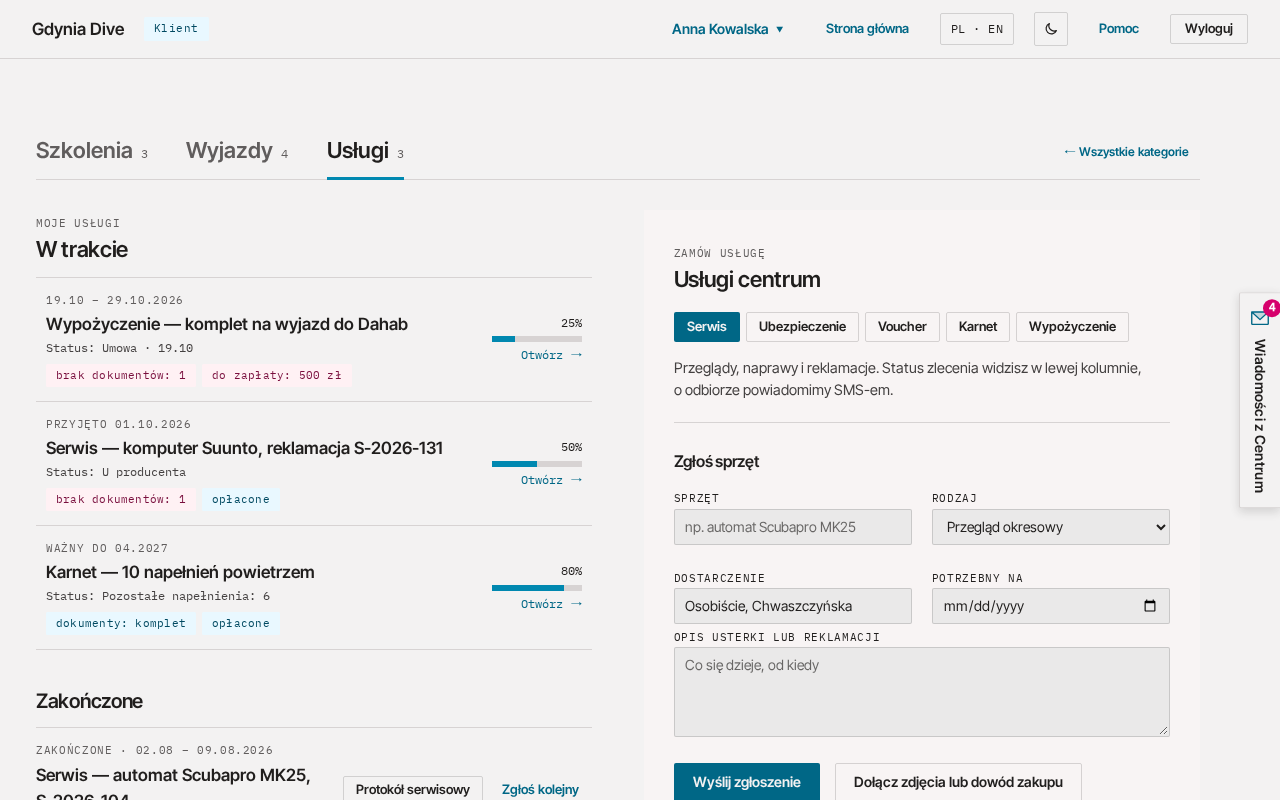
Fill in the form:
| Field | What to enter |
|---|---|
| Equipment (Sprzęt) | e.g. Scubapro MK25 regulator (up to 120 characters) |
| Type (Rodzaj) | Periodic inspection (Przegląd okresowy), Complaint (Reklamacja), Repair (Naprawa) or Certification (Legalizacja) |
| Delivery (Dostarczenie) | how you will deliver the equipment, e.g. in person (up to 120 characters) |
| Needed by (Potrzebny na) | the date by which the equipment should be ready (today or later) |
| Description of the fault or complaint (Opis usterki lub reklamacji) | what is happening and since when (up to 2000 characters) |
With the Attach photos or proof of purchase (Dołącz zdjęcia lub dowód zakupu) button you can add up to 5 JPG, PNG or WEBP photos, each up to 10 MB (up to 11 MB in total). Click Send request (Wyślij zgłoszenie).
You will see the request number, e.g. "Request received as S-2026-001. We will let you know by e-mail when it is ready for collection." (Zgłoszenie przyjęte jako S-2026-001. O odbiorze poinformujemy e-mailem.). The new order appears in the left column, in the In progress (W trakcie) list.
Repair status
An order in progress is in the In progress (W trakcie) list of the Services tab. Click it to see the date, documents, payments and Progress (Postępy w realizacji), i.e. the repair steps. The order goes through these stages:
- submitted (zgłoszone): waiting to be accepted by the service;
- accepted (przyjęte): the service has received the equipment;
- in progress (w toku): diagnosis or repair, also at the manufacturer;
- ready (gotowe): the equipment is waiting for collection;
- handed over (wydane): the equipment has been collected.
An order can also be cancelled. When the equipment is ready for collection, we will let you know by e-mail. A handed-over or cancelled order moves to Completed (Zakończone), with the service report to download if we issued one, and the Report another (Zgłoś kolejny) button.