My details
In My details (Moje dane) you save the participant's details once, and the sign-up wizard fills them in for every later online sign-up. Open it from the account menu: click your name in the header, then My details (Moje dane). You do not have to use it: you can enter the details at each sign-up. Return to the profile start screen with the ← All categories (← Wszystkie kategorie) button.
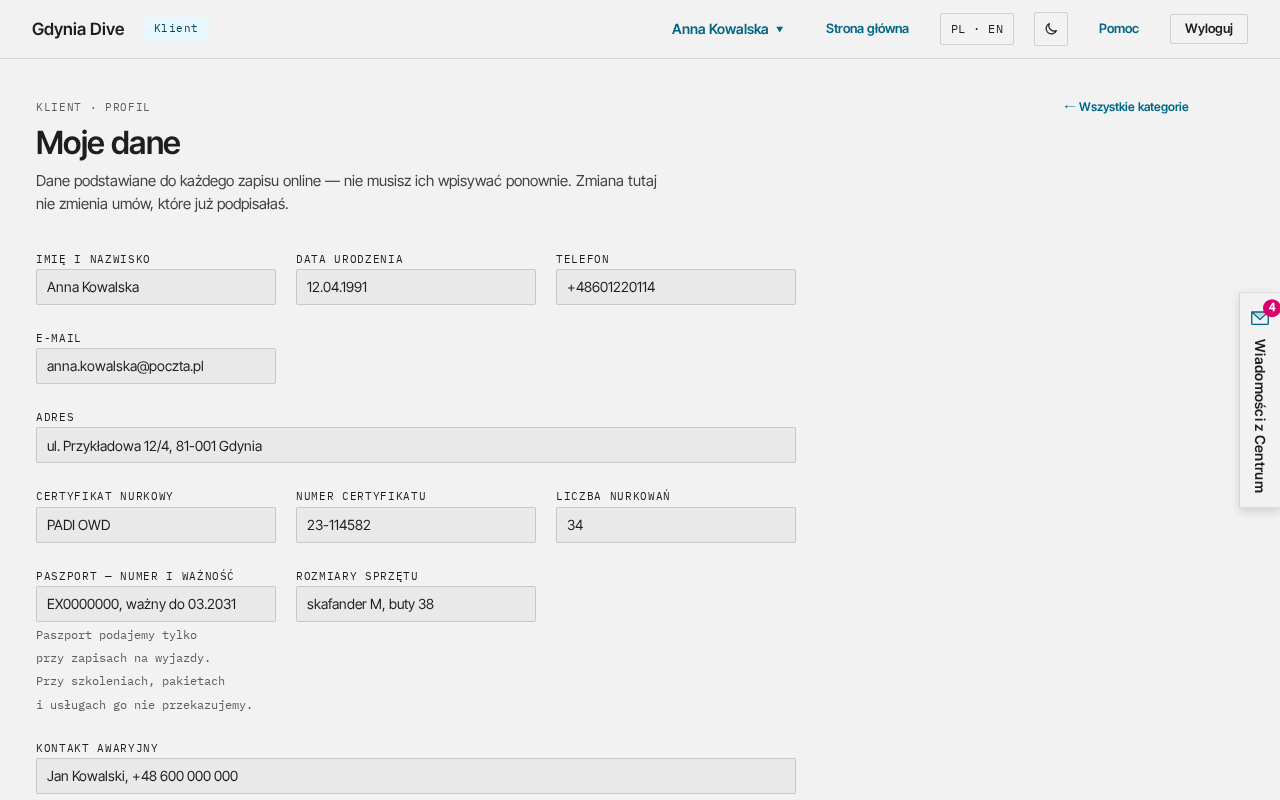
What you can save
| Field | What to enter |
|---|---|
| Full name (Imię i nazwisko) | of the participant, up to 120 characters |
| Date of birth (Data urodzenia) | in the DD.MM.YYYY format |
| Phone (Telefon) and E-mail | contact details of the participant |
| Address (Adres) | street, postcode and town |
| Diving certification (Certyfikat nurkowy) and Certification number (Numer certyfikatu) | e.g. PADI OWD |
| Number of dives (Liczba nurkowań) | from 0 to 100,000 |
| Passport — number and expiry (Paszport — numer i ważność) | needed for trips abroad; we pass it on only with trip sign-ups |
| Equipment sizes (Rozmiary sprzętu) | e.g. wetsuit and boots |
| Emergency contact (Kontakt awaryjny) | name and phone of the person we call in an emergency |
You can save your passport for future trips. The wizard fills it in only when you sign up for a trip; with courses, packages and services we do not pass it on (note under the field). If, in such a sign-up, you save another person's details as yours (Zapisz jako moje dane (zastąpi obecne)), the saved passport is removed, so the wizard does not fill in someone else's passport on your next trip.
Saving the details
- Fill in the fields you want to save.
- Click Save details (Zapisz dane).
You will see "Details saved." (Dane zapisane.). You can also save the details in step 1 of the wizard: the "Save the details in my profile for future sign-ups" (Zapisz dane w moim profilu na kolejne zapisy) box is ticked there when you have no saved details yet.
Details in the sign-up wizard
When you have saved details, step 1 of the wizard shows a summary. You then have three options:
- Edit details (Edytuj dane): correct the details before the sign-up. Tick "Update the details in my profile" (Zaktualizuj dane w moim profilu) if the change should also stay in the profile;
- I am signing up someone else (Zapisuję inną osobę): an empty form for another participant. Their details do not replace yours unless you tick "Save as my details (replaces the current ones)" (Zapisz jako moje dane (zastąpi obecne));
- Delete saved details (Usuń zapisane dane): removes the details from the profile.
Deleting the details
Click Delete saved details (Usuń zapisane dane) in My details or in the wizard. You will see "Saved details deleted." (Zapisane dane usunięte.).
Deleting the details from the profile does not change sign-ups you have already made: each sign-up keeps its own copy of the participant's details from the moment of signing up, needed for the contract, PADI registration or insurance. We keep these copies like the rest of the sign-up (chapter Privacy).